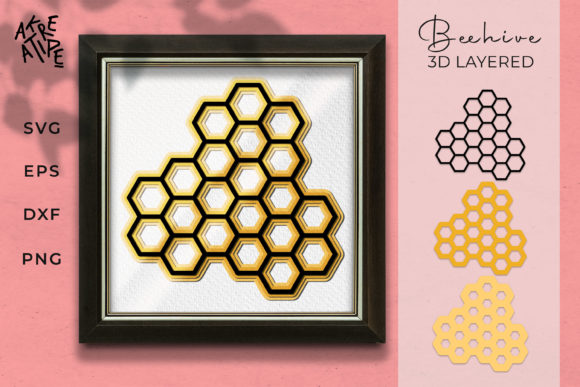
Beehive 3D Layered: Customizable Craft Design
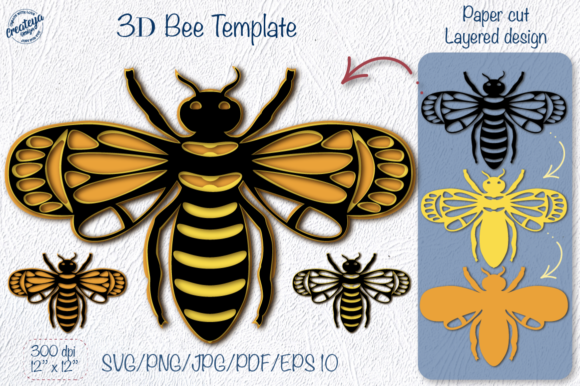
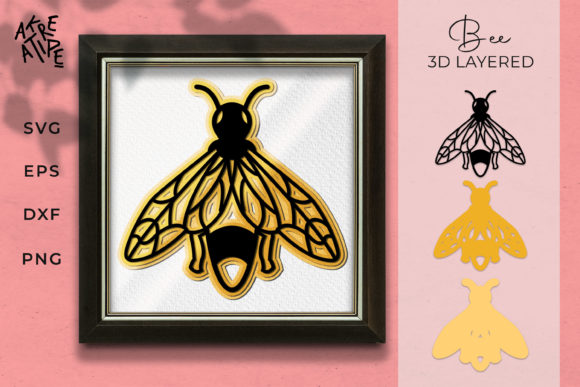
Creating a unique, handmade gift or a striking piece of home decor does not always require expensive equipment or years of artistic training. With the right digital assets, anyone can produce professional-looking results. The Beehive 3D Layered design is a versatile cut file that transforms simple materials into intricate, multi-dimensional art. This design is perfect for gifts, home decorations, and as a sign for special days, offering a beautiful way to celebrate milestones or add character to your living space.
One of the most appealing aspects of this project is its customizability. The colors displayed in product images are merely examples to inspire you. You have the freedom to change the color scheme according to your personal taste, the theme of the event, or the existing decor of your home. Whether you prefer vibrant hues for a birthday party or muted tones for a sophisticated wedding sign, the layered structure allows for endless creative possibilities.
Why Choose a 3D Layered Design?
A 3D layered design adds depth and visual interest that flat graphics simply cannot achieve. By stacking different layers of material, you create shadows and dimension that catch the light and draw the eye. The Beehive 3D Layered pattern utilizes an intricate setting with custom details, making it suitable for creators who want their projects to stand out. It bridges the gap between beginner-friendly crafts and advanced artistic endeavors, providing a satisfying challenge without being overwhelming.
This type of design supports various goals and needs. For hobbyists, it offers a relaxing weekend project. For small business owners, it provides a product line for Etsy shops or craft fairs. Educators can use it to teach students about geometry, layering, and precision cutting. Regardless of your background, the ability to customize colors and materials ensures that each finished piece feels personal and unique.
Recommended Materials for Cutting
To get the best results with the Beehive 3D Layered design, selecting the right material is crucial. The intricate nature of the layers means that some materials will perform better than others depending on the level of detail you wish to preserve. Here are some recommended options:
- Cardstock (65lb): A popular choice for beginners and experienced crafters alike. It cuts cleanly and holds its shape well when layered.
- Plywood and MDF: Ideal for creating durable home decorations or signs. These materials provide a sturdy base and allow for staining or painting.
- Acrylic: Adds a modern, sleek look. Acrylic sheets can be laser-cut to achieve sharp, precise edges that reflect light beautifully.
- Paper and Cardboard: Great for quick prototypes or lightweight decorations. Cardboard can be painted or covered with fabric for a rustic aesthetic.
- Vinyl and Iron-On Transfer Paper: Perfect if you plan to apply the design to t-shirts, tote bags, or other fabric items.
When working with these materials, pay close attention to the tackiness of your cutting mat. If your mat has lost its stickiness, cardstock or paper may lift during the cutting process, leading to tears or misaligned layers. Ensuring your surface is secure is one of the simplest yet most important steps in achieving a flawless finish.
Compatibility and File Formats
The Beehive 3D Layered listing is designed to work with a wide variety of software and cutting machines, ensuring accessibility for all users. The package includes multiple file formats to accommodate different tools and skill levels:
- SVG: Compatible with Silhouette Studio Designer (Paid Edition), Cricut Design Space, Make the Cut, Sure Cuts A Lot, and Brother Scan N Cut. This format is ideal for vector-based editing and scaling.
- DXF: Suitable for Silhouette Studio Basic (Free Edition) and hand-cutters who prefer using stencils or manual tracing methods.
- EPS: Designed for professional graphic design software such as Adobe Illustrator, Corel Draw, and Inkscape. This format preserves complex paths and is excellent for detailed editing.
- PNG: High-resolution raster images included for printing purposes or use in other software programs that do not support vector files.
All files are conveniently provided in one zipped folder, making it easy to organize and access your assets. Whether you are using a basic free version of software or a full suite of professional tools, there is a format here that will work for you.
Important Tips for Success
While the Beehive 3D Layered design is user-friendly, following specific guidelines will help you avoid common pitfalls. If you plan to use iron-on transfer paper to apply the design to clothing or fabric, remember to follow the directions provided by the transfer paper manufacturer carefully. A critical step often overlooked is clicking the “flip horizontal” button before finalizing your print job. Without this mirroring step, your text and intricate details will appear backward on the final product.
Additionally, consider the scale of your project. Because the design features intricate settings and custom layers, very small prints may lose definition. Test a single layer on scrap material before committing to your final piece. This trial run helps you adjust your machine’s speed, pressure, and blade depth, ensuring clean cuts throughout the entire design.
Digital Product Information
Please note that this listing contains a DIGITAL product. No physical items will be sent to you. Upon purchase, you will receive immediate access to download the SVG, EPS, DXF, and PNG files. This instant availability allows you to start your project right away, whether you are preparing for a last-minute gift or planning a long-term decor update.
The flexibility of digital files means you can print and cut as many copies as you need. This makes the Beehive 3D Layered design an economical choice for those looking to create multiple decorations for parties, weddings, or retail inventory. You own the rights to use these files for your personal creations, giving you the freedom to experiment and innovate.
Final Thoughts
Incorporating the Beehive 3D Layered design into your crafting routine opens up a world of creative potential. Its adaptability across various materials, from soft cardstock to hard acrylic, ensures that it fits seamlessly into any maker’s toolkit. By choosing the right colors and materials, and by paying attention to details like mat tackiness and file mirroring, you can produce stunning results that impress friends, family, and customers alike.
Whether you are a seasoned pro or just starting your crafting journey, this design offers a rewarding experience. It combines technical precision with artistic expression, resulting in a tangible piece of art that tells a story. Take advantage of the included compatibility overview and file formats to find the workflow that suits you best. With the Beehive 3D Layered design, the only limit is your imagination.