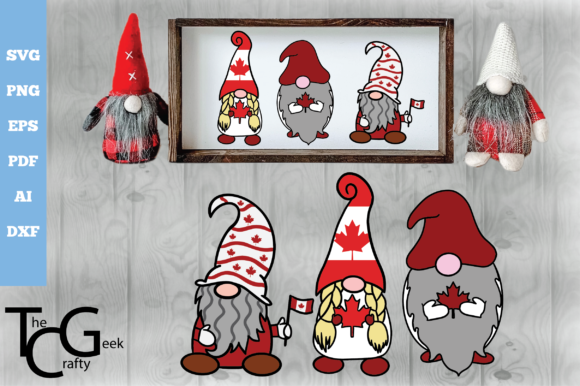
3D Layered Canada Day Gnomes
Integrating festive digital assets into a production workflow requires more than just downloading a file; it demands an understanding of file compatibility, software ecosystems, and the end-use application. The 3D Layered Canada Day Gnomes digital download represents a specific category of vector-based design assets tailored for creators who need precision, scalability, and ease of use across multiple platforms. For small business owners, hobbyists, and professional designers alike, these files serve as foundational components in creating high-quality, themed merchandise or decorative items.
This guide outlines how to effectively utilize these assets within your existing creative processes, ensuring that the transition from digital concept to physical product is seamless. By focusing on technical specifications, software integration, and practical application, you can maximize the value of this digital purchase while minimizing common pitfalls associated with digital fabrication.
Understanding the Asset Structure
The core value of the 3D Layered Canada Day Gnomes package lies in its multi-format delivery. Unlike single-file downloads that restrict usage to one type of machine or software, this collection provides versatility through a ZIP archive containing three distinct layers per gnome design. Each layer is provided in five different formats: SVG, EPS, PNG, PDF, and AI. This comprehensive approach ensures that whether you are using a desktop cutting machine, a laser engraver, or standard printing services, you have the appropriate file type ready for immediate use.
Before extraction, it is crucial to recognize that these files are designed to work together. The "layered" aspect refers to the separation of the gnome’s visual components—such as the hat, face, beard, and body—which allows for depth and dimensionality when cut or printed. When you extract the ZIP file, you will find organized folders corresponding to each design element. Proper file organization at this stage is essential for maintaining efficiency during the design phase.
- Vector Formats (SVG, EPS, AI): These are resolution-independent files ideal for cutting machines like Cricut or Silhouette. They allow you to scale the designs to any size without losing quality.
- Raster Format (PNG): Provided at 300 dpi with a transparent background, these files are optimized for direct printing on substrates where cutting is not required, such as mugs, pillows, or canvas prints.
- Print-Ready Format (PDF): These files are structured for straightforward printing workflows, often including crop marks or bleed areas depending on the software used to open them.
Software Compatibility and Preparation
A critical step in the implementation process is verifying software compatibility. While the files are designed to be universally accessible, the method of opening and editing them varies significantly between applications. Purchasing the 3D Layered Canada Day Gnomes assumes that you have access to compatible software. It is important to note that not all cutting machines support all file types natively.
For users of Silhouette Studio, the SVG and DXF files are typically the most efficient starting points. These formats preserve the layer structure, allowing you to separate the gnome’s components for individual color cuts. Similarly, Cricut Design Space handles SVG files well, though users should be aware that complex layered designs may require manual grouping or ungrouping after import to ensure proper alignment. If you are working with Sure Cuts A Lot or other third-party software, the EPS and AI files provide robust compatibility, offering precise control over node editing and path manipulation.
When importing these files, always check the bounding box and scaling. Digital assets can sometimes appear disproportionately large or small depending on the default settings of your software. Use the software’s measurement tools to verify dimensions before sending the job to your machine. This preliminary check prevents material waste and ensures that the final gnome fits correctly on your chosen substrate, whether it is a t-shirt chest area or a standard greeting card.
Integration into Creative Workflows
The utility of these gnomes extends beyond simple decoration; they fit into broader production pipelines for entrepreneurs and educators. For small business owners producing Canada Day merchandise, these assets reduce design time significantly. Instead of commissioning custom illustrations or attempting to recreate complex shapes from scratch, you can import the layers, adjust colors to match brand guidelines, and proceed directly to production.
In an educational setting, these files can facilitate lessons on digital literacy, graphic design principles, or cultural celebrations. Teachers can use the layered nature of the gnomes to demonstrate how digital images are constructed from individual vector paths. Students can experiment with combining different hat styles or facial features by swapping out layers, fostering creativity while learning software navigation skills.
For marketers and bloggers, the high-resolution PNGs offer ready-to-use graphics for social media campaigns or blog headers. The transparent background feature eliminates the need for tedious background removal in photo editing software, streamlining the content creation process. You can overlay the gnome images onto promotional banners or event flyers with minimal effort, maintaining a consistent visual theme throughout your marketing materials.
Material Selection and Execution
Once the files are prepared in your software, the next phase involves material selection and machine setup. The choice of material depends heavily on the intended output. For apparel, heat transfer vinyl (HTV) is the standard medium. When cutting HTV, remember to mirror the design if the software does not do so automatically, unless you are using print-then-cut techniques. The layered design allows for intricate color blocking, which looks particularly striking on dark-colored shirts where the red and white layers contrast sharply against the fabric.
If you are utilizing a laser engraver, the PDF and SVG files are excellent choices. Laser engraving on wood, leather, or acrylic can produce a sophisticated, monochromatic version of the gnome design. In this context, the "layers" translate to varying depths of engraving or distinct passes, creating a textured effect that mimics the 3D appearance of the original vector design. Ensure your laser software supports the imported file format and adjust power and speed settings according to the material thickness.
For direct-to-garment or sublimation printing, the 300 dpi PNG files are sufficient. Print onto transfer paper first, then apply using a heat press. The high resolution ensures that fine details, such as the gnome’s facial expressions or accessory textures, remain crisp and clear. Always perform a test print on plain paper before committing to expensive materials to verify color accuracy and alignment of the layers.
Quality Control and Long-Term Use
Efficiency in production relies on rigorous quality control. After cutting or printing, inspect each layer for clean edges and complete separation. Vector files generally produce sharp cuts, but dull blades or incorrect machine settings can lead to jagged edges or incomplete cuts, especially in intricate areas like the gnome’s beard or hat brim. Regularly maintain your cutting blades and calibrate your machines to ensure consistent results.
Organizing your digital assets is equally important for long-term use. Keep the extracted ZIP files in a dedicated project folder, perhaps labeled by season or holiday. This practice simplifies future searches and allows you to reuse these assets for subsequent years’ Canada Day promotions or related patriotic events. Because the files are vector-based, you retain the ability to resize and recolor them indefinitely without degradation in quality, making them a durable investment for your digital library.
It is also worth noting that while mock-ups and photos provided in listings are for illustrative purposes only, they serve as valuable references for composition and styling. Use them to visualize how the gnome might look on a finished product, but rely on your own testing to determine the best execution methods for your specific equipment and materials. This empirical approach ensures that your final products meet professional standards and customer expectations.
Conclusion on Implementation
The 3D Layered Canada Day Gnomes digital download is more than a simple graphic; it is a toolkit for efficient, high-quality production. By understanding the nuances of file formats, leveraging compatible software, and adhering to best practices in material handling, you can integrate these assets smoothly into your workflow. Whether you are crafting personalized gifts, launching a seasonal product line, or enhancing educational content, these files provide the flexibility and precision needed to bring your creative vision to life. Focus on preparation, maintain consistency in your execution, and you will achieve professional-grade results every time.