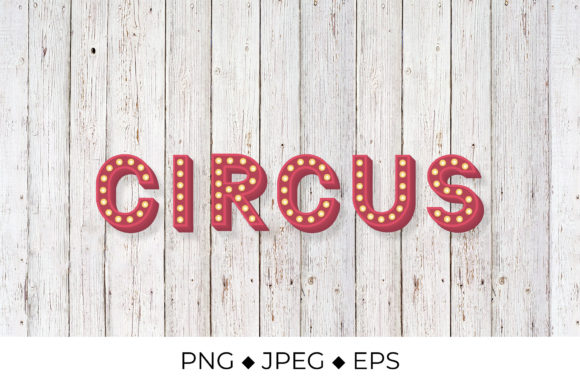
Circus 3d Lettering
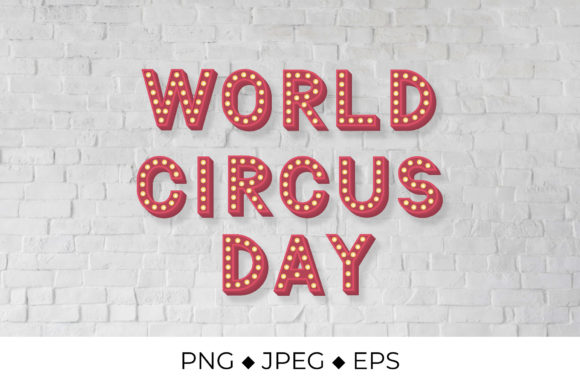
Visual impact is everything in today’s digital and physical marketing landscape. Whether you are designing a custom t-shirt for a small business launch, creating eye-catching social media graphics, or producing educational materials for a classroom, the right typography can make or break your project. Circus 3d Lettering offers a bold, dynamic solution for creators looking to add depth and excitement to their text-based designs. However, purchasing digital assets requires more than just clicking "buy." To ensure you get the most out of this design package, it is essential to understand exactly what you are getting, how to use it effectively, and where common pitfalls lie.
Understanding the Format: What Is Included?
One of the most frequent misunderstandings among buyers of digital design assets is assuming that every file format serves the same purpose. The Circus 3d Lettering listing provides three distinct file types, each serving a specific function. Understanding these differences is crucial for avoiding frustration later in your workflow.
- EPS Vector File (EPS 10): This format is designed for scalability. It is compatible with professional software like Corel Draw, Adobe Illustrator, and Inkscape. If you need to resize the lettering from a small sticker size to a large banner without losing quality, this is your go-to format. Because it is vector-based, you can edit paths and shapes if your software supports it.
- PNG File: This raster image features a transparent background, making it ideal for clipart usage. It is perfect for overlaying on other designs, creating Instagram stickers, or using with cutting machines that accept PNG inputs. The resolution is approximately 10,400 pixels wide, ensuring crisp details even at larger sizes.
- JPEG File: Sized at 5,000x5,000 pixels (approximately 16x16 inches at 300 dpi), this RGB color range file is optimized for iron-on transfers and direct printing. It is ready to use for heat press applications or standard inkjet printing on transfer paper.
All files are packaged in a convenient .zip archive for easy download. Before purchasing, verify that your computer has sufficient storage space and that your preferred software can open these specific formats.
Common Misconceptions About Digital Design Files
Even experienced designers can fall into traps when working with pre-made digital assets. Let’s address some critical points that often lead to dissatisfaction or wasted time.
The SVG Confusion
A significant number of users assume that any high-quality design comes in SVG format, especially if they plan to use it with Cricut or Silhouette cutting machines. Please note that these files are NOT SVG files. While the EPS file is a vector, it is not structured as an SVG, which means it may not import directly into some basic cutting machine software without conversion. Furthermore, the files are not layered. You cannot separate the individual letters or shadows within the design to recolor them individually after purchase. If your project requires fully editable, layer-by-layer customization, this specific package may not be the right fit.
Color Accuracy Expectations
Digital colors rarely translate perfectly to physical prints. The preview images might show vibrant, saturated hues, but the actual output depends heavily on your monitor calibration and printer settings. Colors may vary slightly from screen to screen and printer to printer. This is not a defect in the design but a fundamental limitation of color management across different devices. For professional results, always perform a test print on scrap material before committing to expensive substrates like wood or fabric.
Practical Applications and Best Practices
Once you have downloaded the Circus 3d Lettering files, how do you use them effectively? Here are practical approaches for different user groups.
For Small Business Owners and Marketers
If you are creating merchandise, the JPEG file is your best friend for iron-on transfers. Ensure your printer is set to high-resolution mode (300 dpi) to maintain the sharpness of the 3D effect. When applying to t-shirts, check that the contrast between the lettering and the shirt color is strong enough to read clearly. Dark shirts may require a white underbase print depending on your equipment capabilities.
For Educators and Hobbyists
The PNG file with its transparent background is excellent for digital presentations or printable worksheets. You can drag and drop the image onto a PowerPoint slide or Canva design without worrying about unsightly white boxes around the text. For physical crafts, such as decorating journals or scrapbooks, the high resolution ensures the text remains legible even when printed at smaller sizes.
For Professional Designers
Use the EPS file as a base element in larger compositions. Since it is compatible with Illustrator and Corel Draw, you can place it into your existing brand guidelines. However, remember that because it is not layered, you will need to work with it as a single unit or convert it to outlines if you need to modify the shape. Always save your original files in case you need to revisit the project later.
Before You Buy: A Checklist for Success
To avoid buyer’s remorse and ensure a smooth creative process, consider these final checks:
- Software Compatibility: Do you have Adobe Illustrator, Corel Draw, Inkscape, or another program that supports EPS files? If you only use basic paint programs, the vector file may not be useful to you.
- Printing Capabilities: If you plan to use the JPEG for iron-on transfers, ensure your printer handles high-resolution RGB images well. Poor quality printers may result in pixelation or muddy colors.
- Usage Rights: Review the license agreement included in the download. Most digital designs are for personal use or limited commercial use. Reselling the raw digital files is typically prohibited.
- Background Clarity: Remember that any backgrounds shown in previews—such as t-shirts, wood textures, or wall mockups—are for example viewing only and are NOT included with the design. You will need to source your own backgrounds or apply the design to your chosen medium.
Final Thoughts on Making the Right Choice
Circus 3d Lettering is a versatile asset that can elevate your projects, provided you approach it with the right expectations. It is not a magic bullet that fixes poor design principles, nor is it a one-size-fits-all solution for every technical requirement. By understanding the limitations of non-layered files and the nuances of color reproduction, you can leverage this design to create stunning results.
Taking the time to familiarize yourself with the file formats before purchasing will save you hours of troubleshooting. Whether you are a seasoned entrepreneur or a beginner exploring the world of digital crafting, clear communication about what is included—and what is not—is the key to satisfaction. With careful preparation and realistic application, this 3D lettering pack can become a valuable tool in your creative arsenal.